局域网部署OTA安装内测ipa包

最终效果如图,必须要使用safari打开,plist文件的地址必须支持https(这里采用了业界取巧的方式托管在github上),点击【安装】按钮之后,才会弹窗 【取消】-【安装】
关键代码
<a href="itms-services://?action=download-manifest&url=https://raw.githubusercontent.com/xxx/MyPlists/master/manifest_v3.4.plist"> 安装 </a>
借助了苹果的OTA协议(企业签名或者第三方分发都是采用这种方式)
itms-services://?action=download-manifest&url=OTA(Over-the-Air Technology)升级什么意思? OTA升级对于很多手机爱好者朋友来说,都不会陌生,很多安卓手机或者iPhone手机都支持OTA升级,直白的说,OTA升级就是在线升级手机系统的意思
搭建本地webServer
其实Mac自带apache服务,只是需要一个起手式就能开启服务
#!/bin/bash
webServer() {
    echo "======================================"
	echo "请选择需要执行的apache命令选项"
	echo "0. 开启apache "
	echo "1. 重启apache"
	echo "2. 关闭apache"
	echo "3. 部署目录或者文件到apache根目录"
	echo "======================================"

	read -p "输入选项编号:" number
	case $number in
		0) startApache
		;;

		1) restartApache
		;;

		2) stopApache
		;;

		3) movePathToApache
		;;

	esac
 }
#开启
startApache (){
	sudo /usr/sbin/apachectl start
}
#重启
restartApache (){
	sudo /usr/sbin/apachectl restart
}
#停止
stopApache (){
	sudo /usr/sbin/apachectl stop
}

#部署
movePathToApache (){
	read -p "输入需要部署的项目路径: " root_proj_dir
	webServer_dir="/Library/WebServer/Documents"
	sudo cp -R ${root_proj_dir} ${webServer_dir}
	echo "已部署至127.0.0.1目录下"
	open /Library/WebServer/Documents
}

####################################################
webServer
shell脚本如何不切换到对应的目录下就可以一个命令敲出来全局使用呢?
把shell加入到环境变量中即可,一般在
~/.zshrc或者~/.bash_profile设置
Mac OS原来自带了apache,基本用法总结 mac os下的Apache配置 macOS Sierra 10.12
准备好ipa包和plist文件
先上图,再解释
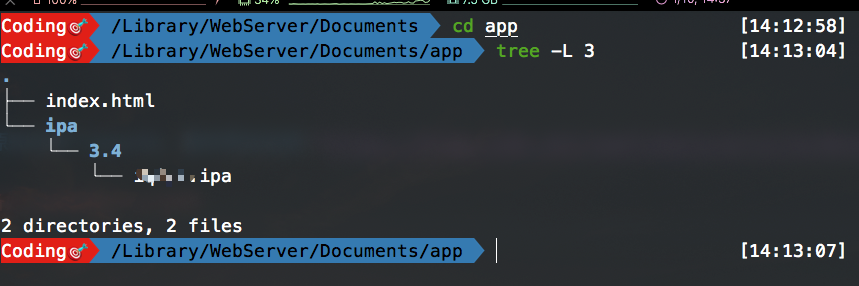
- 部署到
/Library/WebServer/Documents目录下即可 - 查看本机
ip, 根据ipa实际路径得出URL地址192.168.1.101/app/ipa/3.4/xxx.ipa - 把URL配置到
manifest.plist文件中的ipa地址
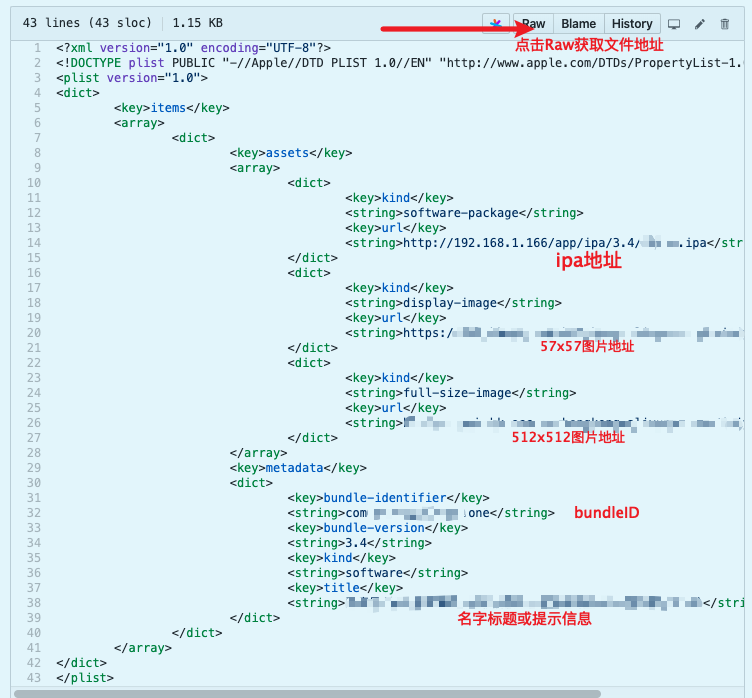
需要配置以下几个配置:
- 应用的
bundleID app的应用名称57x57和512x512的logo图标- 安装时弹窗标题
title
上代码
- html页面
<!doctype html>
<html>
<head>
    <meta http-equiv="Content-Type" content="text/html; charset=UTF-8" />
    <!-- 收藏到桌面时显示的图标 -->
    <link rel="apple-touch-icon" sizes="57x57" href="https://apk-hk.oss-cn.aliyuncs.com/xxx/IOS/512.png" />
    <link rel="apple-touch-icon" sizes="72x72" href="https://apk-hk.oss-cn.aliyuncs.com/xxx/IOS/512.png" />
    <link rel="apple-touch-icon" sizes="114x114" href="https://apk-hk.oss-cn.aliyuncs.com/xxx/IOS/512.png" />
    <link rel="apple-touch-icon" sizes="144x144" href="https://apk-hk.oss-cn.aliyuncs.com/xxx/IOS/512.png" />
    <title>内测分发测试</title>
    <style>
        .download {
            width: 512px;
            height: 100px;
            line-height: 100px;
            background-color: brown;
            color: white;
            font-size: 35px;
            text-align: center;
            margin: 10px auto;
            border-radius: 50px;
        }
        #img {
            margin: 150px auto 10px auto;
            text-align: center;
        }
        a {
            text-decoration: none;
            color: white;
        }
    </style>
</head>

<body>
    <div id="img">
        <!-- logo图标地址换成你自己的 -->
        <img src="https://apk-hk.oss-cn.aliyuncs.com/xxx/iOS/512.png" style="border-radius: 50px;">
    </div>
    <div class="download">
        <!-- https://raw.githubusercontent.com/xxx/MyPlists/master/manifest_v3.4.plist需修改成自己的plist地址  -->
        <a href="itms-services://?action=download-manifest&url=https://raw.githubusercontent.com/xxx/MyPlists/master/manifest_v3.4.plist"> 安装 </a>
    </div>
</body>
</html>
- manifest.plist
<?xml version="1.0" encoding="UTF-8"?>
<!DOCTYPE plist PUBLIC "-//Apple//DTD PLIST 1.0//EN" "http://www.apple.com/DTDs/PropertyList-1.0.dtd">
<plist version="1.0">
<dict>
	<key>items</key>
	<array>
		<dict>
			<key>assets</key>
			<array>
				<dict>
					<key>kind</key>
					<string>software-package</string>
					<key>url</key>
                    <!-- 替换自己的ipa地址 -->
					<string>http://192.168.1.166/app/ipa/3.4/xxx.ipa</string>
				</dict>
				<dict>
					<key>kind</key>
					<string>display-image</string>
					<key>url</key>
                    <!-- 57x57小图标 -->
					<string>https://xxxx/57.png</string>
				</dict>
				<dict>
					<key>kind</key>
					<string>full-size-image</string>
					<key>url</key>
                    <!-- 512x512大图标 -->
					<string>https://xxx/512.png</string>
				</dict>
			</array>
			<key>metadata</key>
			<dict>
				<key>bundle-identifier</key>
                <!-- 修改BundleId -->
				<string>com.xxx.hehe</string>
				<key>bundle-version</key>
                <!-- 修改实际版本号 -->
				<string>3.4</string>
				<key>kind</key>
				<string>software</string>
				<key>title</key>
                <!-- 弹窗标题 可加一些提示 不宜太长 -->
				<string>xxx(如果安装失败:卸载旧版本,或者请到开发人员处添加UDID)</string>
			</dict>
		</dict>
	</array>
</dict>
</plist>
- 部署脚本
#!/bin/bash
echo "================================================================"
echo "请确保app.ipa已在当前目录下"
echo "注意⚠️: 一次只能部署一种环境,请不要放多个ipa到当前目录下"
echo "================================================================"
release_version=`/usr/libexec/PlistBuddy -c 'Print :items:0:metadata:bundle-version' ./manifest.plist`
debug_version=`/usr/libexec/PlistBuddy -c 'Print :items:0:metadata:bundle-version' ./manifest_test.plist`
release_bundleId=`/usr/libexec/PlistBuddy -c 'Print :items:0:metadata:bundle-identifier' ./manifest.plist`
debug_bundleId=`/usr/libexec/PlistBuddy -c 'Print :items:0:metadata:bundle-identifier' ./manifest_test.plist`

if [ ! -f "./app.ipa" ]; then
   echo "当前目录下未检测到app.ipa文件"
   exit 1
fi

read -p "部署Release环境(y/n):      " env
if [[ -n "$env" ]]; then
	 if [[ "$env"="y" ]]; then
	 	echo "******************************"
	 	echo "已选择Release环境"
	 	echo "当前release版本为: $release_version"
		echo "当前release bundleId为: $release_bundleId"
	 	echo "******************************"
	 else
	 	echo "******************************"
	 	echo "已选择Debug环境"
	 	echo "当前debug版本为: $debug_version"
		echo "当前debug bundleId为: $debug_bundleId"
	 	echo "******************************"
	 fi
else
	echo "******************************"
	echo "默认为Release环境"
	echo "当前release版本为: $release_version"
	echo "当前release bundleId为: $release_bundleId"
	echo "******************************"
	env="y"
fi

read -p "版本号(版本号为必填项): " version
if [[ -n "$version" ]]; then
	echo $version
else
   if [[ "$env" = "y" ]]; then
	 version=$release_version
   else
   	 version=$debug_version
   fi
fi

read -p "应用的BundleId(不填写则默认不修改): " bundleId
if [[ -n "$bundleId" ]]; then
	echo "${bundleId}"
else
  	if [[ "$env" = "y" ]]; then
  	  bundleId=$release_bundleId
  	else
  	  bundleId=$debug_bundleId
 	fi
fi

read -p "部署版本描述信息(需要加双引号字符串格式): " commit_message
if [[ -n "$commit_message" ]]; then
	echo "$commit_message"
else
	commit_message="🚀update~"
fi


if [[ "$env" = "y" ]]; then
  /usr/libexec/PlistBuddy -c 'Set :items:0:metadata:bundle-version string $version' ./manifest.plist
  /usr/libexec/PlistBuddy -c 'Set :items:0:metadata:bundle-identifier string $bundleId' ./manifest.plist
  sudo cp -f ./*ipa  /Library/WebServer/Documents/app/ipa/release/app.ipa
else
  /usr/libexec/PlistBuddy -c 'Set :items:0:metadata:bundle-version string $version' ./manifest_test.plist
  /usr/libexec/PlistBuddy -c 'Set :items:0:metadata:bundle-identifier string $bundleId' ./manifest_test.plist
  sudo cp -f ./*ipa  /Library/WebServer/Documents/app/ipa/debug/app.ipa
fi

echo "🎉🎉🎉 部署成功!!!"
echo "确保手机连上ZQun-5G的WiFi"
echo "手机Safari浏览器打开 http://192.168.1.166/app/index.html 即可食用~"

open /Library/WebServer/Documents/app/ipa

rm -rf *.ipa #移除记录

echo "🚀🚀🚀提交代码"

git add .
git commit -am  "$commit_message"
git push origin master
以上~